> ## Documentation Index
> Fetch the complete documentation index at: https://docs.kontratar.com/llms.txt
> Use this file to discover all available pages before exploring further.
# Tracking Government Opportunities
> This guide covers how to find, filter, and track contract opportunities in Kontratar. It also covers managing tracked and discarded opportunities from My Desk.
**Before you begin:** You must be logged in to Kontratar. If you do not have an account, see the [Quick Start](/quickstart).
## Navigating to Opportunities
1. From the Home Dashboard, click **Opportunities** in the left sidebar.
2. The Opportunities section contains two tabs: **SAM** and **Custom**.
## SAM opportunities
The **SAM** tab displays federal contract opportunities sourced from SAM.gov (System for Award Management). SAM is the official U.S. government system for publishing contract solicitations.
To browse SAM opportunities:
1. Select the **SAM** tab.
2. Browse the available listings.
3. Click any opportunity to view its full details.
.png?fit=max&auto=format&n=n4UKL_7oO-2yPGeD&q=85&s=909e7ce4fada05de9b5f2147f836a704)
.png?fit=max&auto=format&n=n4UKL_7oO-2yPGeD&q=85&s=9f9dd13e5668a9fbb9b2d26ce93827a2)
.png?fit=max&auto=format&n=n4UKL_7oO-2yPGeD&q=85&s=0845e8e2a484b0eef2764a676e577493) 4. To track an opportunity, click **Track**. The opportunity moves to **My Desk** for follow-up.
4. To track an opportunity, click **Track**. The opportunity moves to **My Desk** for follow-up.
.png?fit=max&auto=format&n=n4UKL_7oO-2yPGeD&q=85&s=84d45514d932be115dbf8b5e4709a07a) ### Filtering SAM opportunities
You can narrow results using the following filters:
| Filter | Description |
| --------------------- | ------------------------------------------------------------------------------------------------------------------- |
| **NAICS codes** | Filter by industry classification. Only opportunities matching your configured NAICS codes are shown by default. |
| **Government agency** | Filter by specific agency (for example, Department of Defense, GSA, Department of Health and Human Services). |
| **Date range** | Filter by posting date. Options include last 24 hours, last 7 days, and custom ranges. Available from the Home tab. |
You can also generate a proposal or create a response directly from any opportunity in the SAM tab.
## Custom opportunities
The **Custom** tab displays opportunities created manually by your organization. Use this tab for state or local government bids, commercial RFPs, or any solicitation not published on SAM.gov.
To manage custom opportunities:
1. Click the **Custom** tab.
### Filtering SAM opportunities
You can narrow results using the following filters:
| Filter | Description |
| --------------------- | ------------------------------------------------------------------------------------------------------------------- |
| **NAICS codes** | Filter by industry classification. Only opportunities matching your configured NAICS codes are shown by default. |
| **Government agency** | Filter by specific agency (for example, Department of Defense, GSA, Department of Health and Human Services). |
| **Date range** | Filter by posting date. Options include last 24 hours, last 7 days, and custom ranges. Available from the Home tab. |
You can also generate a proposal or create a response directly from any opportunity in the SAM tab.
## Custom opportunities
The **Custom** tab displays opportunities created manually by your organization. Use this tab for state or local government bids, commercial RFPs, or any solicitation not published on SAM.gov.
To manage custom opportunities:
1. Click the **Custom** tab.
.png?fit=max&auto=format&n=n4UKL_7oO-2yPGeD&q=85&s=c4618d9a1a2d27981f595548eca22e1e) 2. View existing custom listings, or create a new one.
3. Click **Proceed to Track** to save a listing to My Desk.
2. View existing custom listings, or create a new one.
3. Click **Proceed to Track** to save a listing to My Desk.
.png?fit=max&auto=format&n=n4UKL_7oO-2yPGeD&q=85&s=b953b4bd581d16883cd0f39a28455f92)
.png?fit=max&auto=format&n=n4UKL_7oO-2yPGeD&q=85&s=5d552ca88440b03b7c01394c22fd5f1d) 4. Use the date filter to sort listings by recency.
You can filter custom opportunities by agency, NAICS code, and other criteria. You can also generate a proposal from any custom listing.
## My Desk
My Desk is your personal workspace for managing all opportunities you have acted on. It contains three tabs:
4. Use the date filter to sort listings by recency.
You can filter custom opportunities by agency, NAICS code, and other criteria. You can also generate a proposal from any custom listing.
## My Desk
My Desk is your personal workspace for managing all opportunities you have acted on. It contains three tabs:
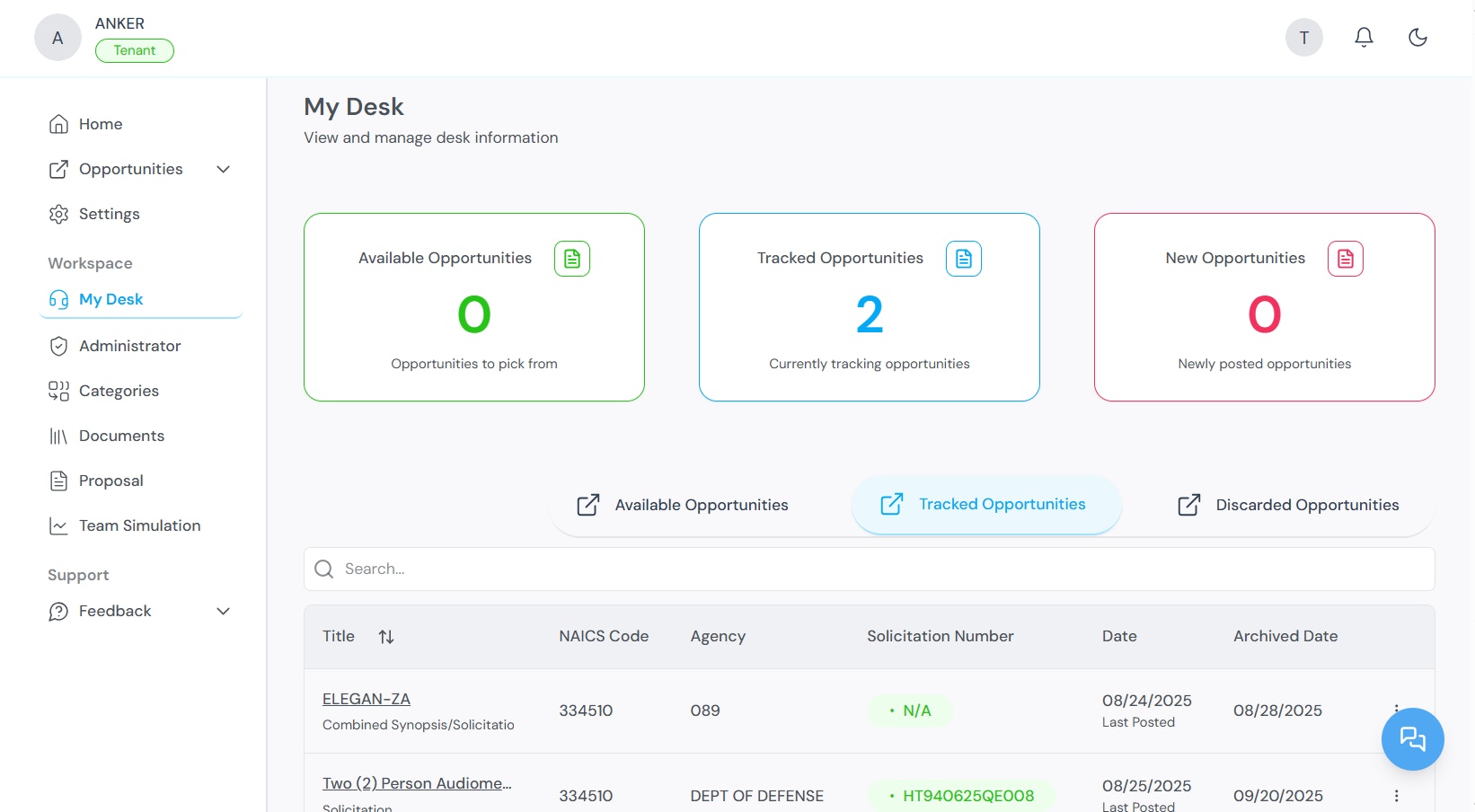 | Tab | Contents |
| --------------------------- | --------------------------------------------------------------------------------------------------------- |
| **Available Opportunities** | Opportunities matching your filters that you have not yet tracked or discarded. |
| **Tracked Opportunities** | Opportunities you are actively pursuing. These are available for proposal generation and team simulation. |
| **Discarded Opportunities** | Opportunities you have removed from your pipeline. You can re-track a discarded opportunity at any time. |
From My Desk, you can:
* Generate proposals and begin proposal drafts for tracked opportunities
* Customize proposal content for each opportunity
* Generate a table of contents for each proposal
### Partners
Some contract opportunities require collaboration with external organizations. The Partners section within My Desk allows you to:
* View opportunities that may require teaming arrangements
* View ranking data for potential collaborators
* Manage partnership-based submissions
* Manage and edit partner profiles
### Discarded opportunities
All opportunities you have chosen to pass on are stored in the Discarded Opportunities tab. You can:
* Review previously discarded opportunities at any time
* Re-track an opportunity if it becomes relevant again
## What to do next
After tracking opportunities:
* Go to **My Desk** to review your tracked pipeline.
* Use [Team Simulation](/TeamSimulation) to evaluate your fit before committing to a bid.
* Use [Proposal Generation](/ProposalGeneration) to create a response for a tracked opportunity.
## Related topics
* [Quick Start](/quickstart) — Account creation and initial configuration.
* [Proposal Generation](/ProposalGeneration) — Creating proposals from tracked opportunities.
* [Team Simulation](/TeamSimulation) — Evaluating organizational fit.
* [Administrator Workspace](/AdministrationWorkspace) — Managing partners, agencies, and NAICS codes.
**Parent topic:** [Kontratar v1.2 Documentation](/)
| Tab | Contents |
| --------------------------- | --------------------------------------------------------------------------------------------------------- |
| **Available Opportunities** | Opportunities matching your filters that you have not yet tracked or discarded. |
| **Tracked Opportunities** | Opportunities you are actively pursuing. These are available for proposal generation and team simulation. |
| **Discarded Opportunities** | Opportunities you have removed from your pipeline. You can re-track a discarded opportunity at any time. |
From My Desk, you can:
* Generate proposals and begin proposal drafts for tracked opportunities
* Customize proposal content for each opportunity
* Generate a table of contents for each proposal
### Partners
Some contract opportunities require collaboration with external organizations. The Partners section within My Desk allows you to:
* View opportunities that may require teaming arrangements
* View ranking data for potential collaborators
* Manage partnership-based submissions
* Manage and edit partner profiles
### Discarded opportunities
All opportunities you have chosen to pass on are stored in the Discarded Opportunities tab. You can:
* Review previously discarded opportunities at any time
* Re-track an opportunity if it becomes relevant again
## What to do next
After tracking opportunities:
* Go to **My Desk** to review your tracked pipeline.
* Use [Team Simulation](/TeamSimulation) to evaluate your fit before committing to a bid.
* Use [Proposal Generation](/ProposalGeneration) to create a response for a tracked opportunity.
## Related topics
* [Quick Start](/quickstart) — Account creation and initial configuration.
* [Proposal Generation](/ProposalGeneration) — Creating proposals from tracked opportunities.
* [Team Simulation](/TeamSimulation) — Evaluating organizational fit.
* [Administrator Workspace](/AdministrationWorkspace) — Managing partners, agencies, and NAICS codes.
**Parent topic:** [Kontratar v1.2 Documentation](/)